If your Shopify store sends emails with Klaviyo or Omnisend, you can add a spin-to-win wheel in two ways: use the wheel built into your email platform’s signup forms, or install a gamified popup app that sends every signup to Klaviyo or Omnisend.
Both work. They just suit different stores. This guide shows how each native wheel works, where its limits are, and how to decide whether you need a dedicated app.
Quick answer
Klaviyo has a spin-to-win block in its form editor (one wheel per form, 2–6 slices). Omnisend has a Wheel of Fortune form item (3–20 slices) on all plans. Use them if a classic wheel is all you need. Add a gamified popup app if you want other games (scratch card, slot machine, gift boxes), more targeting options, or a capture tool whose price doesn’t grow with your contact list.
Table of Contents
- Klaviyo’s spin-to-win wheel
- Omnisend’s Wheel of Fortune
- Native wheels vs a gamified popup app
- When a dedicated app makes sense
- How to connect a gamified popup to Klaviyo or Omnisend
- The welcome flow that makes the wheel pay off
- FAQ
Klaviyo’s Spin-to-Win Wheel
Klaviyo added spin-to-win as a block inside its signup form editor. You build a popup or flyout as usual, drop the wheel block in, and set each slice’s prize and probability.
How to set it up (summary of Klaviyo’s help center):
- Create a new sign-up form (or edit an existing one) and add an email or SMS consent field.
- Add the spin-to-win block on a step after the consent field.
- Choose how many slices you want and set a reward and a whole-number probability for each. All probabilities must add up to 100%.
- Klaviyo automatically creates a success step for each slice, where you show the coupon.
- Optionally, build a flow or segment based on the prize each profile won.
Limits to know:
- One wheel per form, with 2 to 6 slices.
- The wheel can’t sit on the same step as both an email and a phone field, and can’t be on the success step.
- Unique coupon codes require an email field marked as required (unless the form is only shown to existing profiles).
- Spin-to-win forms can’t use Smart Opt-in, tap-to-text SMS consent or Continue with Shop.
- Klaviyo advises against 0% slices: showing a prize nobody can win can create legal risk.
Omnisend’s Wheel of Fortune
Omnisend’s Wheel of Fortune is an item you add to a popup in its form builder, or pick from a preset template. Omnisend says it is available on all of its plans, including the free one.
What it supports (from Omnisend’s help center):
- 3 to 20 slices, each with its own label, color or image.
- Static or unique codes. Unique per-contact codes are currently available only for Shopify stores.
- Probabilities on winning slices, in whole numbers adding up to 100%. Losing slices are decorative: visitors never land on them.
- Spin duration adjustable from 1 to 30 seconds.
- It can be used in a multistep form, but on only one step.
Native Wheels vs a Gamified Popup App
| Klaviyo spin to win | Omnisend Wheel of Fortune | Gamified popup app (SmashPops) | |
|---|---|---|---|
| Extra cost | Included in Klaviyo | Included in Omnisend | Free plan, then from $9/month |
| Price grows with your list? | Yes (Klaviyo plan) | Yes (Omnisend plan) | No, priced by popups shown |
| Games | Wheel only | Wheel only | Wheel, scratch card, slot machine, pick a gift, card dance, claw machine |
| Slices | 2–6 | 3–20 | Custom prizes and odds |
| Unique one-time codes | Yes (email field required) | Yes (Shopify only) | Yes: % off, fixed amount, buy X get Y |
| Data lands in your email tool | Instantly (native) | Instantly (native) | Via integration (Klaviyo, Omnisend, Mailchimp, ActiveCampaign, Drip, AWeber) |
| Works if you change email tool | No, rebuild forms | No, rebuild forms | Yes, switch the integration |
Native wheel details from Klaviyo and Omnisend help center articles, checked in November 2026.
When a Dedicated App Makes Sense
Stay with the native wheel if you are happy with a single spin-to-win format and want the simplest setup. Consider a gamified popup app when:
- Your visitors have “wheel fatigue.” Spin-to-win is everywhere. A scratch card or a pick-a-gift game stands out more, and lets you rotate formats for Black Friday or Christmas without starting from scratch.
- You want to test game types. Gamified popups convert at roughly twice the rate of standard popups in public benchmarks, but the best game depends on your audience. See our gamified pop-ups guide for the data.
- Your list is growing fast. With native forms, the cost of capture is bundled into a plan that rises with your contacts. An app priced by popups shown keeps that part flat.
- You might change email platform one day. Popups that live in a separate app don’t need to be rebuilt if you move from Omnisend to Klaviyo, or the other way round.
How to Connect a Gamified Popup to Klaviyo or Omnisend
Here is the setup with SmashPops. Other gamified popup apps follow a similar pattern.
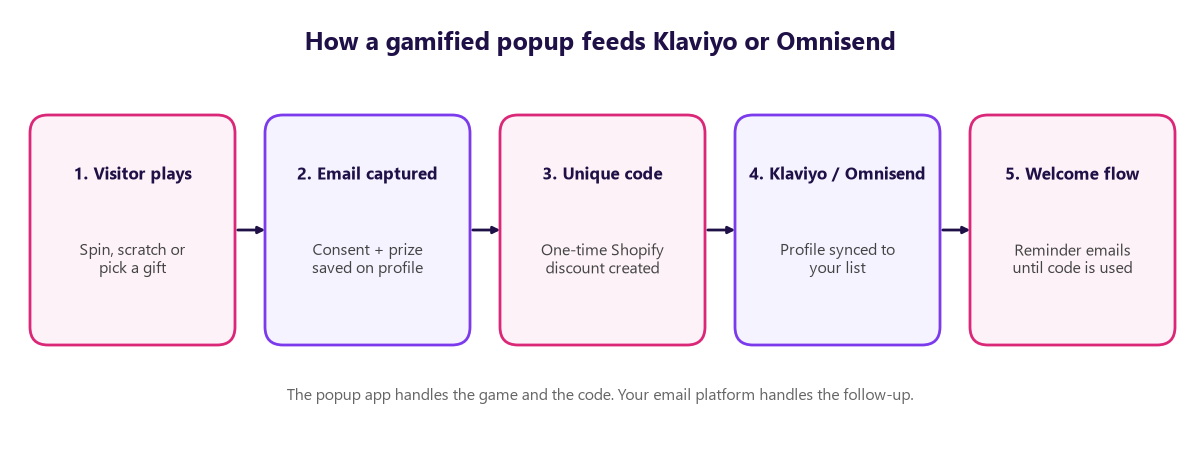
- Install the app from the Shopify App Store and create your first campaign (see how to set up your first campaign).
- Pick a game: Spin the Wheel if you are migrating from a native wheel, or a Scratch Card or Pick a Gift to stand out.
- Set your prizes and odds. Need inspiration? Our list of spin the wheel prize ideas includes ready-made prize mixes by store type.
- Turn on unique coupons so each winner gets a one-time Shopify code. See how to set up automatically generated coupons.
- Connect Klaviyo or Omnisend in the integrations settings and choose the list new players should join. For Omnisend, we have a guide on sending the coupon via email with Omnisend.
- Set your triggers: exit intent, scroll depth, number of visits, page, device or country (details in the display rules guide).
- Turn off your old native form so visitors don’t see two popups.
The Welcome Flow That Makes the Wheel Pay Off
The game gets the email. The flow gets the order. Whichever wheel you use, set up a short welcome sequence in Klaviyo or Omnisend:
| When | Goal | |
|---|---|---|
| Immediately | “Here’s your prize” with the code and a button to your best-sellers | Deliver the reward even if they closed the popup |
| Day 1 | Brand story, reviews and social proof | Build trust before the first order |
| 24 hours before expiry | “Your prize expires tomorrow” | Create urgency and lift redemption |
| After expiry (optional) | A smaller “last chance” offer | Recover players who didn’t buy |
A coupon reminder bar on the site does the same job for visitors who keep browsing. Our Shopify Klaviyo integration guide covers the rest of the Klaviyo flows worth setting up.
FAQ
Does Klaviyo have a spin to win wheel?
Yes. Klaviyo’s sign-up form editor includes a spin-to-win block. Each form can have one wheel with 2 to 6 slices, and you set the reward and win probability of each slice.
Does Omnisend have spin to win?
Yes. Omnisend calls it Wheel of Fortune. It is available on all Omnisend plans and supports 3 to 20 slices, with unique discount codes for Shopify stores.
Can I use a spin wheel app with Klaviyo?
Yes. Gamified popup apps like SmashPops integrate with Klaviyo and send each new subscriber, with their consent, to the Klaviyo list you choose. Your Klaviyo flows then take over.
Will a separate popup app slow down my store?
Any script adds some weight. Keep only one capture popup active at a time and disable the native form you are replacing, so you are not loading two tools for the same job.
Klaviyo spin to win or a popup app: which converts better?
For the same wheel, the same prizes and the same timing, results should be similar. The difference comes from what an app adds: other game formats, more targeting rules and the ability to test them. Run each for two weeks on similar traffic and compare signups and coupon redemptions.
More games for your Klaviyo or Omnisend list
SmashPops adds a spin wheel, scratch card, slot machine and more to your Shopify store, with unique coupons and automatic sync to Klaviyo and Omnisend. Free plan available.
