Cost per click calculation starts with a simple formula: total ad spend ÷ total clicks. If you spend $2,500 and get 1,250 clicks, your CPC is $2.00.
That sounds straightforward when you're looking at a dashboard. It gets less straightforward when you're running an ecommerce store and trying to decide whether that click was cheap, expensive, or misleading.
A new campaign goes live. You open Google Ads, Meta Ads Manager, or Shopify reports and see impressions, reach, spend, clicks, add-to-carts, coupon redemptions, and maybe a few sales. The problem isn't the lack of numbers. It's knowing which number to trust first.
CPC is usually that first checkpoint. It tells you what you're paying to bring one visitor to your site. For ecommerce teams, that's useful because traffic has to be bought before it can convert. But CPC alone doesn't tell you whether the campaign produced profitable demand, especially when the customer journey includes extra steps like a coupon pop-up, an email capture, or a delayed purchase after the click.
That's where many generic guides stop too early. They teach the math, then leave you alone with a dashboard and a budget meeting.
Table of Contents
- The Core Cost Per Click Calculation Formula
- Introduction Beyond the Basic Math
- Calculating CPC with Real Ecommerce Examples
- Why Your CPC Varies Across Ad Platforms
- Advanced Attribution and the True Cost of a Click
- Actionable Strategies to Lower Your CPC
The Core Cost Per Click Calculation Formula
The formula itself is simple. The judgment call is not.
For PPC reporting, CPC is calculated as total ad spend ÷ total clicks. If a campaign spent $1,200 and generated 600 clicks, the CPC is $2.00. That gives you a clean traffic cost baseline before you start evaluating conversion rate, average order value, and margin.
In ecommerce, that baseline matters because a click can start several different customer paths. One visitor buys on the first session. Another clicks, triggers a coupon pop-up, joins email, and purchases two days later through the discount message. A third clicks, takes the coupon, and never buys at all. The CPC formula does not change across those cases. What changes is how useful that click turned out to be.
What counts in the formula
Use only two inputs. Spend and clicks from the same platform, campaign scope, and date range.
That sounds obvious, but first reviews often go wrong here. Teams often pull spend from the ad platform, clicks from GA4, and revenue from Shopify, then try to treat the result as one clean story. It is not. Google Ads clicks and GA4 sessions are not identical. Meta link clicks and landing page views are not identical. If you mix those definitions, your CPC analysis starts from a mismatch.
A practical setup looks like this:
- Use ad platform spend with ad platform clicks for headline CPC.
- Match the reporting window exactly.
- Keep campaign type separate. Brand search, non-brand search, prospecting social, and retargeting traffic rarely belong in one blended CPC figure.
- Check what the platform counts as a click before comparing channels.
For ecommerce stores, I also recommend separating click cost from post-click behavior early. The click may be cheap, but if the landing page pushes too hard on a coupon pop-up and attracts low-intent email signups, that campaign can look efficient on CPC while underperforming on new customer revenue.
How CPC connects to other PPC metrics
CPC is an input metric. It becomes useful when paired with what happened after the click.
A lower CPC usually helps, but only if traffic quality holds. I have seen campaigns cut CPC by broadening targeting or relaxing search intent, then lose more money because conversion rate dropped and average order value softened. Cheap traffic is only good when it still produces profitable actions.
The numbers connect like this:
- CPC shows what you paid for the visit.
- CTR helps explain why the platform priced that traffic the way it did.
- Conversion rate shows how often those clicks turned into the action you wanted.
- CPA shows what it cost to generate the conversion.
- ROAS or profit per order shows whether buying that traffic made financial sense.
For ecommerce teams, there is one more layer. If the click leads to a coupon sign-up first, the platform may get credit for the click while email gets credit for the sale. That does not make the CPC wrong. It means the click started a journey that your attribution setup needs to trace properly. Generic CPC guides usually stop before that point, but stores with pop-ups, discount codes, and return visits cannot.
Introduction Beyond the Basic Math
A first campaign review for an ecommerce store often looks better than it really is. Click volume is up, the traffic report looks healthy, and the ad platform says the campaign is working. Then you trace a few orders and see the actual path. A shopper clicks an ad, lands on a product page, signs up through a coupon pop-up, leaves, opens the discount email later, and buys on a return visit that may or may not be credited back to paid media.
That gap is why CPC matters, and why it is only the opening number.
CPC gives you a clean read on what you paid to get a visitor to the site. For a new ecommerce marketing manager, that number is useful because it creates a common starting point across campaigns that behave very differently. It helps answer a simple question first: how expensive is traffic before you argue about attribution, assisted conversions, or whether the pop-up stole credit from the ad click.
For stores with email capture offers, discount overlays, and retargeting in the mix, that distinction matters a lot. The ad platform may report one story. Shopify, GA4, and your email tool may report another. A headline CPC can still be accurate as far as it goes, but it does not tell you whether those clicks became profitable customers, email leads, coupon hunters, or all three.
Practical rule: Match spend and clicks to the exact same reporting window, or the number is not useful.
Use CPC early in the review process because it helps isolate traffic cost before you blend in everything else. If one campaign is buying visits at a reasonable price and another is paying far more for similar intent, that is a bidding, audience, or creative problem. If CPC looks fine but sales quality is weak, the issue usually sits further down the funnel, often on the landing page, offer, or attribution setup.
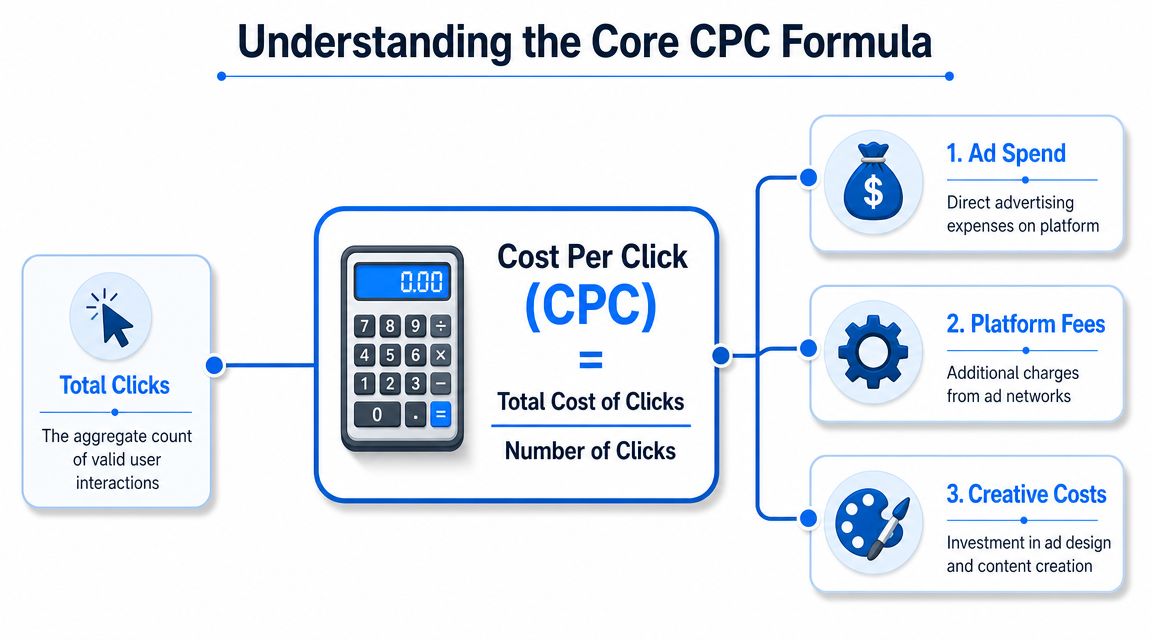
I treat CPC as a screening metric, not a verdict. It is useful for spotting expensive traffic fast. It is less useful for judging campaign quality in an ecommerce account where a click can trigger an email signup, a coupon code, a delayed purchase, and a messy source split across platforms.
This walkthrough is useful if you want a visual refresher on PPC math before digging into your own account data:
A low CPC only helps if the click has buying intent or contributes meaningfully to revenue you can track. Cheap traffic that only collects discount codes gets expensive fast.
Calculating CPC with Real Ecommerce Examples
Abstract formulas make sense in theory. They become useful when you apply them to actual campaign decisions.
Example one retargeting traffic
Take a Shopify apparel store running a Meta retargeting campaign. The goal is to bring back product viewers who didn't purchase on the first session. You pull two basic fields from the ad platform: spend and clicks.
The calculation itself is simple. Divide spend by clicks, and you have your CPC. What matters next is how you compare that result with a different campaign, not whether the arithmetic was difficult.
Example two higher intent search traffic
Now compare that with a Google Shopping or Search campaign for a kitchen tools brand. Search traffic often behaves differently because shoppers are actively looking for something, not just scrolling through a feed.
Here's a simple spreadsheet-style view using the same CPC logic:
| Campaign | Ad Platform | Total Ad Spend | Total Clicks | Calculated CPC |
|---|---|---|---|---|
| Apparel Retargeting | Meta | $2,500 | 1,250 | $2.00 |
| Kitchen Search | Google Ads | $2,500 | 1,250 | $2.00 |
The numbers above intentionally use the verified example so the math is clear. In a real account, those rows would differ. The point is the workflow:
- Pull spend for the exact reporting window.
- Pull clicks for that same window.
- Divide spend by clicks.
- Compare campaign to campaign only after the formula is clean.
What gets interesting in ecommerce is what happens after the click. The apparel campaign might show a solid CPC, but if visitors arrive, grab a coupon, and convert later through email, your ad platform may undervalue that traffic. The search campaign might show the same headline CPC while producing more immediate transactions.
That's why I tell new managers to use CPC as a sorting metric, not a verdict. It helps you identify where to investigate.
A few practical checks make the comparison more useful:
- Match campaign intent: Compare prospecting against prospecting, and retargeting against retargeting. Don't compare a warm-audience coupon campaign to a cold broad-reach test and expect the CPC story to mean the same thing.
- Watch the landing page path: A click to a collection page behaves differently from a click to a single product page. Add a coupon layer, and behavior changes again.
- Check post-click friction: If one campaign sends traffic to a slow page, a cluttered mobile layout, or an aggressive pop-up sequence, CPC may stay stable while sales quality drops.
When the clicks look healthy but revenue doesn't, the problem is often after the ad, not inside it.
In such cases, newer ecommerce teams often overreact. They pause the ad set with the higher CPC because it looks less efficient on the surface. Then they find out later that it was the campaign bringing in better-fit shoppers.
A more reliable review process looks like this:
| Review question | What you're checking |
|---|---|
| Is the CPC calculation clean | Spend and clicks use the same dates and same campaign scope |
| Are you comparing similar campaigns | Intent, audience warmth, and offer are reasonably aligned |
| Did the click have a fair chance to convert | Landing page, product offer, and on-site experience are consistent |
CPC is the first line in the analysis, not the final line.
Why Your CPC Varies Across Ad Platforms
A lot of confusion comes from treating platform CPC as if every click means the same thing. It doesn't.
A click from Google Search often comes from active intent. A click from Instagram may come from curiosity, impulse, or creative-driven interest. A click from LinkedIn usually comes with different audience economics entirely. The price changes because the context changes.
Platform benchmarks are directional not absolute
Benchmark data is useful for setting expectations, not for judging your account in isolation. One 2025 roundup cited by Sender's CPC statistics page reports average CPCs of $5.26 for Google Ads search, $0.63 for display ads, $1.54 for Bing, $1.11 for Facebook's global median, $1.43 for Instagram, $0.98 for Amazon, and $5.58 for LinkedIn.
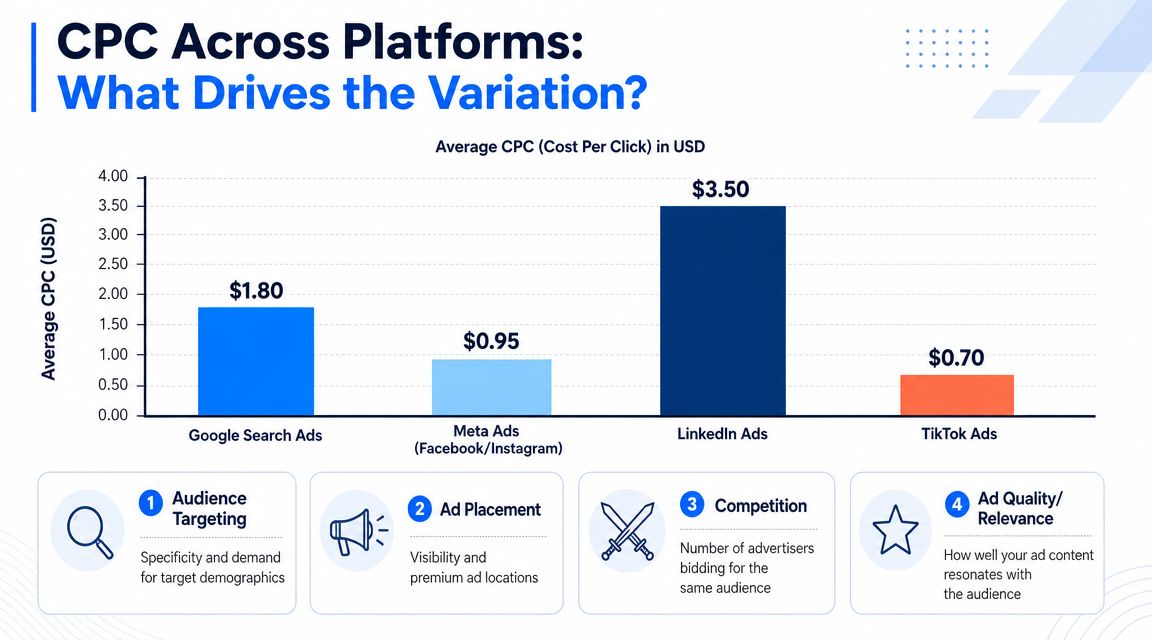
Those ranges should immediately stop you from making lazy comparisons. If LinkedIn traffic costs more than display traffic, that isn't automatically a problem. It may reflect a different audience, ad environment, and auction pressure.
If you're expanding channel mix, this also matters for expectations around adjacent social commerce efforts like Facebook Marketplace growth opportunities. A lower-cost click in one Meta surface still needs to be judged by buying intent and product fit.
The real reasons platform CPC changes
Three forces usually explain most CPC variation.
First, user intent. Search platforms tend to catch people with clearer demand. Social platforms often interrupt attention and have to earn the click with creative. That alone changes what advertisers are willing to bid.
Second, auction pressure. If many advertisers want the same audience, CPC rises. This is why branded product categories, gift-heavy retail moments, and high-value niches can feel expensive fast.
Third, ad and landing page relevance. Platforms reward ads that match user expectations better. If your creative promises one thing and your product page shows another, you usually pay for that mismatch one way or another.
A practical way to read cross-platform CPC is:
- Google Search: Often stronger intent, often higher click prices.
- Display: Usually cheaper clicks, but traffic quality can vary widely.
- Meta platforms: Creative and audience matching matter heavily.
- Amazon: Product relevance is central because the shopper is already in a commerce environment.
- LinkedIn: Expensive clicks can still make sense when the audience is specialized.
The mistake is asking, “Which platform has the lowest CPC?” The better question is, “Which platform is buying the right kind of visit at a sustainable cost?”
Advanced Attribution and the True Cost of a Click
At some point, every ecommerce team discovers that the platform-reported CPC isn't the whole story.
Headline CPC versus fully loaded CPC
Some reporting uses a narrow definition of CPC. It divides direct ad spend by clicks and stops there. Other approaches ask a harder question: what did it really cost to acquire those visits once you include the surrounding expenses?
That distinction matters. As noted in Umbrex's marketing analysis guide, marketers often compare headline CPC with a broader true CPC that can include management fees and platform-specific costs.
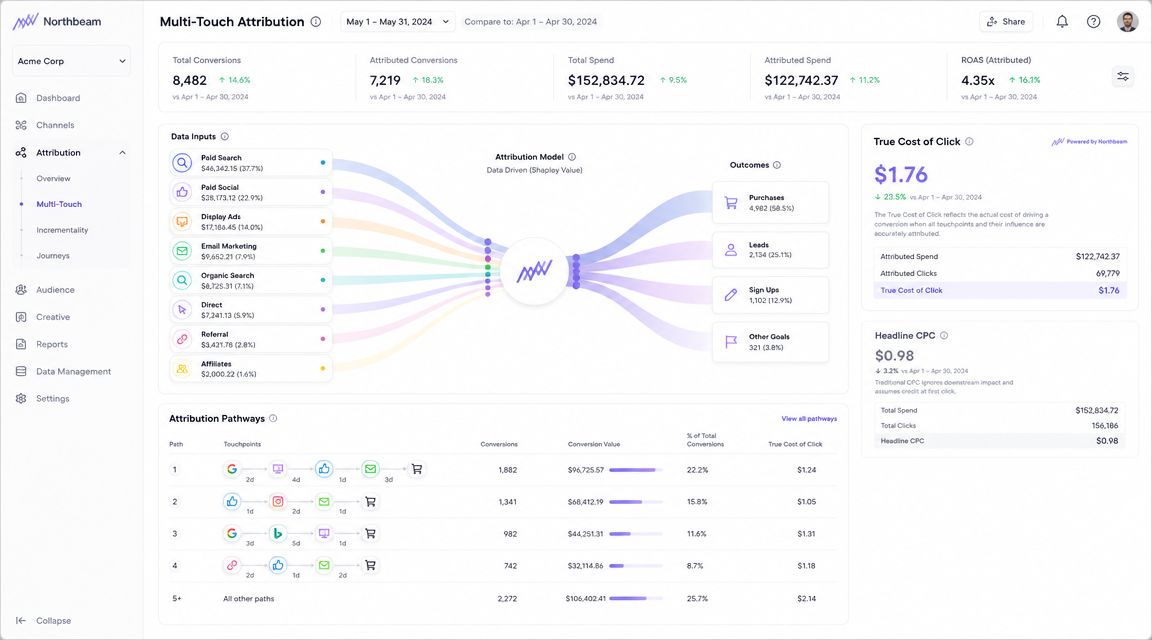
If you work with a freelancer or agency, use paid creative production, or rely on multiple tools to support the campaign, the gap between headline CPC and business reality gets wider. The dashboard isn't wrong. It's just incomplete.
A platform can report an efficient CPC while your finance sheet tells a very different story.
Disciplined reporting helps. If your team needs a cleaner process, a practical resource on step-by-step report creation can help structure the handoff between ad metrics, store data, and decision-making.
The coupon popup journey changes the analysis
Ecommerce attribution gets more complicated when the click isn't the final persuasion event.
A shopper clicks a paid ad. They land on a product page. A coupon pop-up appears. They submit an email to receive the code. They leave. Later, they return through email or direct traffic and complete the purchase with that coupon.
Which touchpoint gets credit?
The ad platform may claim the click. Your email platform may claim the conversion. Your store may record coupon usage without clearly tying it back to the original paid session unless event tracking is set up carefully. That's why stores using on-site offers need a tighter analytics setup, including event logic like sending an analytics event after a popup interaction.
In practice, I'd review this journey through three lenses:
- Traffic acquisition cost: What did the ad click cost on the platform?
- Offer cost: Did the discount reduce margin enough to change how valuable that click was?
- Assisted conversion value: Did the click start a customer journey that another channel later finished?
If you ignore the coupon step, you can overstate how profitable the ad was. If you ignore the ad click and give all credit to the coupon or email, you can undervalue paid traffic that initiated the sale.
The right answer usually isn't one-number attribution. It's a reporting view that acknowledges the click, the on-site incentive, and the final purchase path together.
Actionable Strategies to Lower Your CPC
Lowering CPC works best when you improve relevance, not when you just squeeze bids and hope for the best.
Changes that usually help
- Tighten audience intent: Separate warm visitors, recent product viewers, and broader prospecting pools. Cleaner segmentation usually gives the platform a better signal.
- Rewrite weak ad copy: If the promise is vague, people who click are often less qualified. Sharper copy can filter traffic before it gets expensive.
- Use stronger creative matching: Product, headline, offer, and landing page should feel like the same conversation.
- Cut waste with exclusions: Negative keywords, placement controls, and audience exclusions help prevent paying for clicks you never wanted.
- Test landing page continuity: If the ad highlights a bundle, gift angle, or category, the landing page should continue that exact message.
- Review campaign timing and structure: Promotions that overlap or run too long often muddy performance. A simple campaign scheduling workflow helps keep tests cleaner.
If you're selling through social commerce channels, this kind of optimization discipline also applies beyond classic PPC. Teams working through TikTok inventory and paid traffic can use a specialized guide for TikTok Shop sellers to think through channel-specific CPC pressure.
What usually wastes time
Some fixes sound smart but rarely solve the underlying issue.
- Dropping bids blindly: You may lower CPC and lose the clicks with buying intent.
- Merging very different audiences: Broader isn't always better if your products serve distinct shopper motivations.
- Judging ads too quickly: Ecommerce campaigns need enough signal from both click behavior and on-site actions to make a sound call.
- Optimizing only for cheap traffic: The lowest CPC campaign in the account isn't automatically the most profitable one.
A good cost per click calculation gives you the starting number. Strong campaign management turns that number into a decision.
If your store uses coupons, list growth, and paid traffic together, the missing piece is often cleaner on-site conversion tracking. SmashPops helps Shopify brands turn standard pop-ups into interactive coupon experiences that support email capture, direct sales, and clearer post-click engagement data so you can judge campaign performance with more confidence.
