You open Shopify, see a strong sales number, and think the store is finally working. Then you check your bank balance, your ad account, your shipping bill, and the stack of app charges. The excitement fades fast.
That gap is why so many owners search for a Shopify profit margin calculator and still end up confused. Most calculators tell you a clean product margin. They don't tell you what you kept after payment fees, discounts, shipping, returns, apps, and the cost to get the customer in the first place.
If you're new to Shopify, this is one of the first mindset shifts that matters. Revenue tells you activity. Net profit tells you whether the business is healthy.
Table of Contents
- Why Shopify Sales Don't Equal Profit
- Gross vs Contribution vs Net Profit Margin
- All the Costs You Need for Your Shopify Profit Calculator
- Calculating Your Store's True Profit Margin
- What Is a Good Profit Margin for a Shopify Store
- How to Increase Your Shopify Profit Margins
Why Shopify Sales Don't Equal Profit
A lot of new merchants assume the Shopify dashboard is telling the whole story. It isn't. Sales can look healthy while the business itself stays fragile.
The main reason is simple. Most profit margin content still treats the calculator as a gross margin tool, while merchants in Shopify community discussions point out that the number stops matching reality once shipping, discounts, returns, payment fees, and other expenses get included, as discussed in this Shopify Community thread on calculator mismatches.

A store owner usually notices the problem in reverse. They don't start with accounting theory. They start with a practical question: "If sales were strong, why isn't there much cash left?"
The hidden leak isn't one big cost
It's usually a pile of smaller costs:
- Acquisition costs that looked manageable in the ad platform but feel heavier when attached to each order
- Discounts that helped conversion but cut revenue before you ever reached profit
- Fulfillment costs that rose faster than expected
- Operational tools like apps, email platforms, and support software
- Returns and refunds that reverse revenue while still leaving real expenses behind
A basic Shopify profit margin calculator can still be useful. It just can't be the final answer if you're making pricing or ad decisions from it.
Practical rule: If your margin calculation ignores what it took to acquire, process, fulfill, and support the order, you're not calculating business profit. You're calculating a partial product margin.
That distinction matters more as the store grows. A product can look profitable on paper and still be a weak SKU once variable costs and overhead hit it. That's why experienced operators stop celebrating revenue first and start asking a tougher question: what did this order contribute after all the costs attached to it?
Gross vs Contribution vs Net Profit Margin
The term "profit margin" often means three different things. In a Shopify store, that distinction changes real decisions. A product can show a healthy gross margin and still lose money after ad spend, shipping, payment fees, returns, and software are attached to the order.
Three margins, three jobs
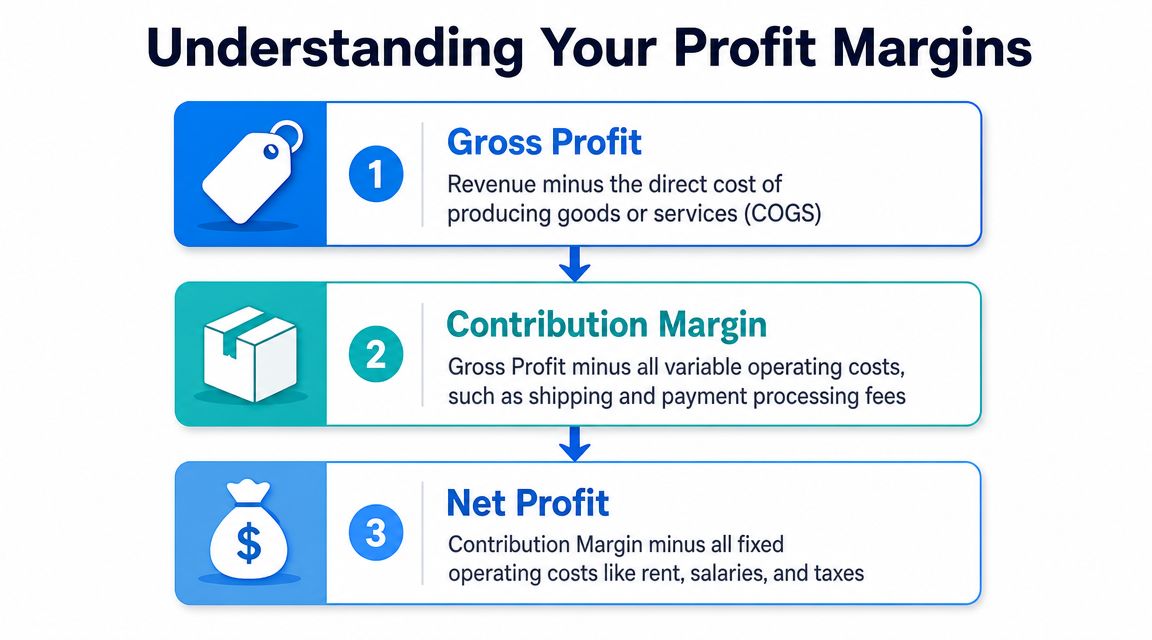
A Shopify profit margin calculator usually revolves around gross profit margin, contribution margin, and net profit margin. The definitions are simple. The consequences are not.
| Margin type | What it tells you | What gets subtracted |
|---|---|---|
| Gross profit margin | Product-level margin before operating costs | Cost of goods sold |
| Contribution margin | What the order contributes after variable selling costs | COGS plus variable costs like shipping, transaction fees, discounts, and ad spend |
| Net profit margin | What the business actually keeps | All expenses |
Gross margin uses the standard formula [(Revenue – COGS) / Revenue] x 100. If a product sells for $100 and costs $60 to make, the gross margin is 40%. Clean math. Useful starting point.
It is also where many store owners stop too early.
Gross margin answers a product question. Contribution margin answers an order question. Net margin answers a business question.
That middle layer gets missed all the time. On Shopify, contribution margin is often the most practical number for day-to-day decisions because it shows whether a sale still makes sense after the costs that rise with each order. That includes shipping, payment processing, pick-and-pack fees, affiliate commissions, and customer acquisition cost. If you run paid traffic, understanding your cost per click calculation helps you connect campaign spend to contribution margin instead of treating ad costs as a separate problem.
How each margin changes decisions
Each margin has a job.
- Gross margin helps with product pricing, sourcing, and discount limits.
- Contribution margin helps evaluate channels, offers, and promotions at the order level.
- Net margin shows whether the store still works after apps, payroll, contractors, rent, subscriptions, refunds, and other overhead are included.
A simple example makes the difference clearer. A product sells for $100. COGS are $55, so gross margin is 45%. Sounds strong. Then the order picks up $12 in ad cost, $8 in shipping and fulfillment, $3 in payment fees, and a 10% pop-up coupon that cuts revenue by another $10. Contribution drops fast. Add your monthly app stack, support costs, and returns rate, and the final net margin may be far thinner than the gross number suggested.
That is why coupon tactics need a profitability check, not just a conversion check. A pop-up discount can increase conversion rate and still hurt the store if it raises discount cost more than it lowers CAC or improves average order value. The same promotion can be profitable on email traffic and unprofitable on paid social. Margin math has to reflect channel economics.
If you want a plain-language companion to the formulas, the Market Edge guide to profit is a useful reference because it treats margin as an operating decision, not just an accounting metric.
Gross margin can make a SKU look healthy. Contribution margin can show the campaign behind it is weak. Net margin shows whether the store actually keeps money after everything is paid.
Store owners who separate these three numbers make better calls on pricing, ad budgets, and discount strategy. Store owners who lump them together usually overestimate profit.
All the Costs You Need for Your Shopify Profit Calculator
Most bad profit calculations fail before the math starts. The formula isn't the problem. The missing inputs are.
A reliable Shopify profit margin calculator needs a complete cost map. If even one recurring expense is left out, the final number gets distorted. New merchants usually miss costs that don't sit neatly inside Shopify product data, especially marketing spend and software overhead.
The cost buckets most stores miss
Start with these categories and pull them from the systems where they live.
Product costs
Include unit cost, packaging tied to the product, and any direct per-item production cost. This is your COGS layer.Transaction costs
Pull payment-related charges and any order-level fees from the tools handling checkout and payment collection.Fulfillment costs
Include shipping labels, packaging used for shipping, warehouse or fulfillment partner charges, and any per-order handling costs.Marketing costs
Most store owners undercount in this area. Paid social, search, influencer fees, affiliate payouts, and creative production all affect acquisition economics. If you're running paid traffic, knowing your blended click costs helps frame what you can afford, which is why this guide on cost per click calculation is useful when you start connecting traffic spend to margin instead of traffic to sales alone.Operational software
Email platforms, review apps, subscriptions, support tools, loyalty software, analytics, and design tools belong here. Individually they look manageable. Together they reshape net margin.Financial adjustments
Discounts, refunds, returns, and chargebacks all change the actual outcome of a sale. If you ignore them, your spreadsheet will always look prettier than your bank account.
Net profit calculation inputs checklist
Use a spreadsheet and create one sheet for orders and one for monthly overhead. That's usually enough to get a usable view.
| Cost Category | Includes | Where to Find It |
|---|---|---|
| Product costs | Product unit cost, product packaging, direct production costs | Supplier invoices, inventory records, product cost spreadsheet |
| Transaction costs | Payment processing charges, checkout-related fees | Payment processor dashboard, Shopify payouts, finance records |
| Fulfillment costs | Shipping labels, shipping packaging, pick and pack, warehouse charges | Shipping platform, 3PL portal, carrier invoices |
| Marketing costs | Ad spend, influencer payouts, affiliate commissions, creative spend | Meta Ads Manager, Google Ads, affiliate platform, marketing budget sheet |
| Operational software | Email platform, pop-up tools, reviews, support apps, analytics tools | App billing pages, software invoices, accounting software |
| Financial adjustments | Discount codes, refunds, returns, exchange costs, chargebacks | Shopify analytics, returns platform, support records, accounting software |
A few practical habits make this easier:
- Separate variable and fixed costs. Shipping and ad spend move with orders. App subscriptions usually don't.
- Allocate overhead consistently. Don't change your method every month or your trendline becomes useless.
- Track discounts as a real cost. A coupon isn't just a conversion tactic. It's a reduction in revenue.
- Review returns by product line. Some products create hidden margin damage because return handling keeps eating cash after the sale is reversed.
The best calculator is often a boring spreadsheet with disciplined inputs. Fancy dashboards don't fix missing cost data.
If you're building this for the first time, don't wait for perfect accounting. Start with the cost categories above, then tighten the process each month.
Calculating Your Store's True Profit Margin
Theory clicks once you watch a single order lose money line by line. That's the point where most store owners stop treating "profit" as a dashboard label and start treating it as an operating number.
A simple order walkthrough
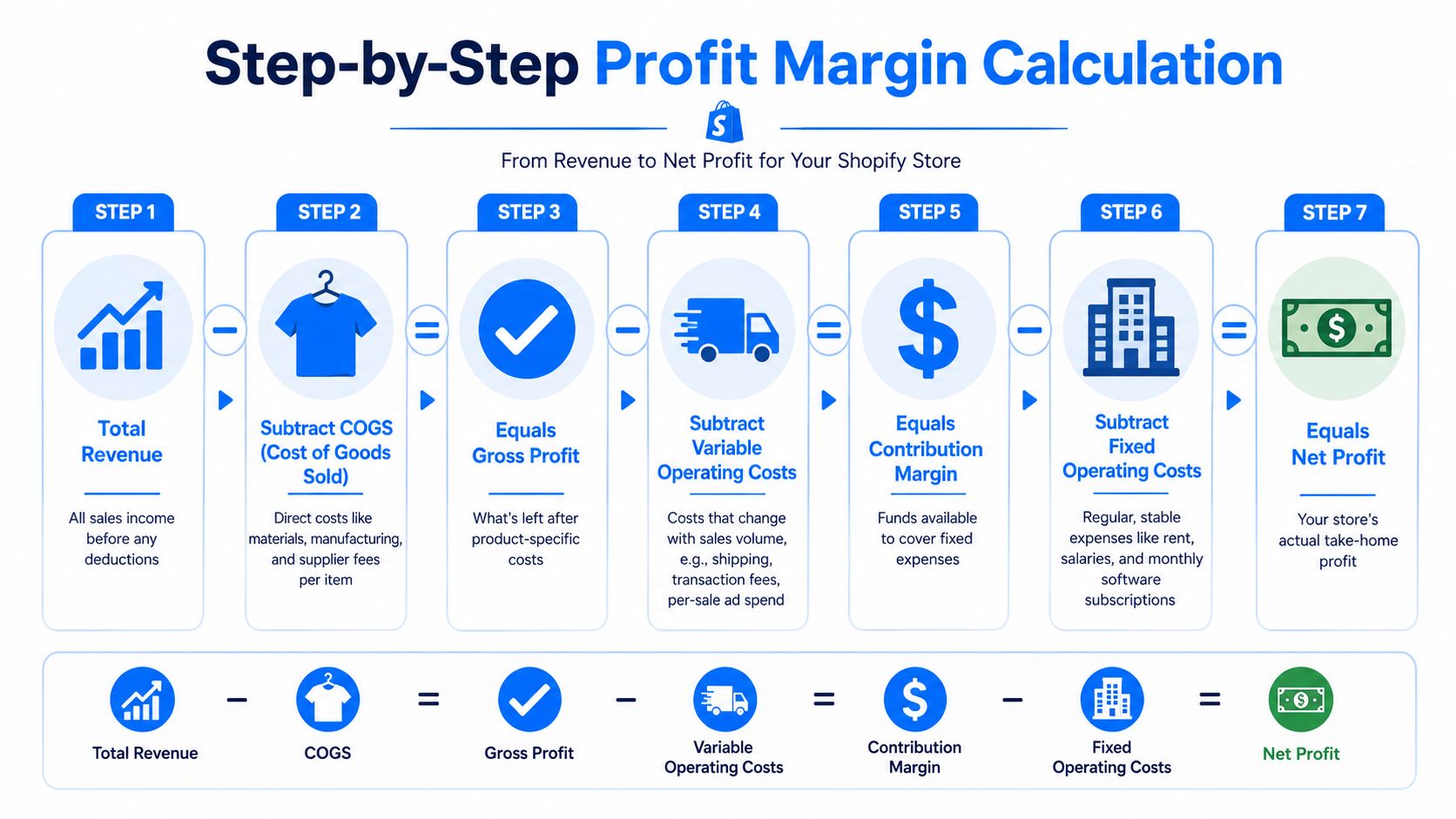
Take one order from your store and trace it all the way through.
Start with revenue. That's the amount the customer paid after any discount was applied. From there, subtract the direct product cost. That gives you gross profit.
Then subtract the sale-level costs that came with getting and delivering that order:
- Shipping and fulfillment
- Payment fees
- Ad spend or blended customer acquisition cost
- Coupon or promotional impact if the order came through an offer
- Any other variable order-level costs
What's left is your contribution margin. That number tells you whether the order itself is helping carry the store.
If you want to use discounting without letting it wreck margin, your offer structure matters. For example, a product bundle or threshold-based promotion can behave very differently from a flat coupon, which is why many merchants test mechanics like those in this guide on how to set up buy x get y discounts.
After contribution margin, subtract the store's fixed operating costs allocated across your sales. That includes apps, software, support tools, retainers, and other recurring overhead. What's left is net profit.
Here's a visual walkthrough before you build your own sheet:
Where the number usually breaks
The math itself isn't hard. The discipline is hard.
Store owners usually run into trouble in three places:
| Common mistake | What happens | Better approach |
|---|---|---|
| Ignoring acquisition cost | Paid orders look more profitable than they are | Assign channel or blended marketing cost to orders |
| Treating discounts as marketing only | Margin gets overstated | Count discounts as reduced revenue in the order math |
| Forgetting fixed overhead | Contribution margin gets mistaken for net profit | Allocate monthly overhead across sales periods |
If an order only works before ads, shipping, and tools are counted, it doesn't really work.
Once you calculate a few orders this way, patterns show up fast. Some products survive discounts well. Some channels deliver customers that look expensive upfront but buy again. Some promotions lift conversion but compress margin too much to scale safely. That's why a Shopify profit margin calculator becomes more useful when you run scenarios, not just snapshots.
What Is a Good Profit Margin for a Shopify Store
Once you've calculated real net margin, the next question is obvious. Is that number good, weak, or dangerous?
The short answer is that context matters. The more useful answer is to compare your store against practical ecommerce ranges and then judge whether your current margin gives you enough room to absorb mistakes, test offers, and keep operating without stress.
Benchmarks are useful, but context matters
A 2026 Shopify-focused guide from AMZ Prep reports that the average net profit margin for Shopify stores ranges from 16% to 26%, and it also says a healthy Shopify DTC brand often targets 10% to 20% net margin, while margins below 5% can be a danger zone in this AMZ Prep Shopify profit calculator guide.
Those figures are useful because they give you a planning range, not a promise. A young brand in aggressive growth mode may accept thinner margins for a period. A mature store with repeat purchase strength should usually expect cleaner economics.
Shopify itself also notes, in the benchmark discussion summarized earlier, that there isn't one official universal target. That's the right way to think about it. A "good" margin depends on what you sell, how you acquire customers, and how many support and fulfillment costs the business carries.
If you want another practical framework for thinking about retail economics beyond Shopify alone, this retail profit margin calculator is a helpful companion.
How to judge your own margin
Ask tougher questions than "Is this above average?"
- Does the margin leave room for ad volatility when acquisition gets more expensive?
- Can the business handle returns and discounting without falling apart?
- Are you funding growth from actual profits or just recycling revenue?
A few rough interpretations help:
- Low single-digit net margin means the store has very little margin for error.
- Double-digit net margin usually means you have some operating space.
- A stronger net margin with weak repeat purchase behavior can still become unstable if acquisition costs rise.
The point isn't chasing a benchmark for bragging rights. The point is using your Shopify profit margin calculator to see whether pricing, channel mix, and overhead are moving in the right direction month after month.
How to Increase Your Shopify Profit Margins
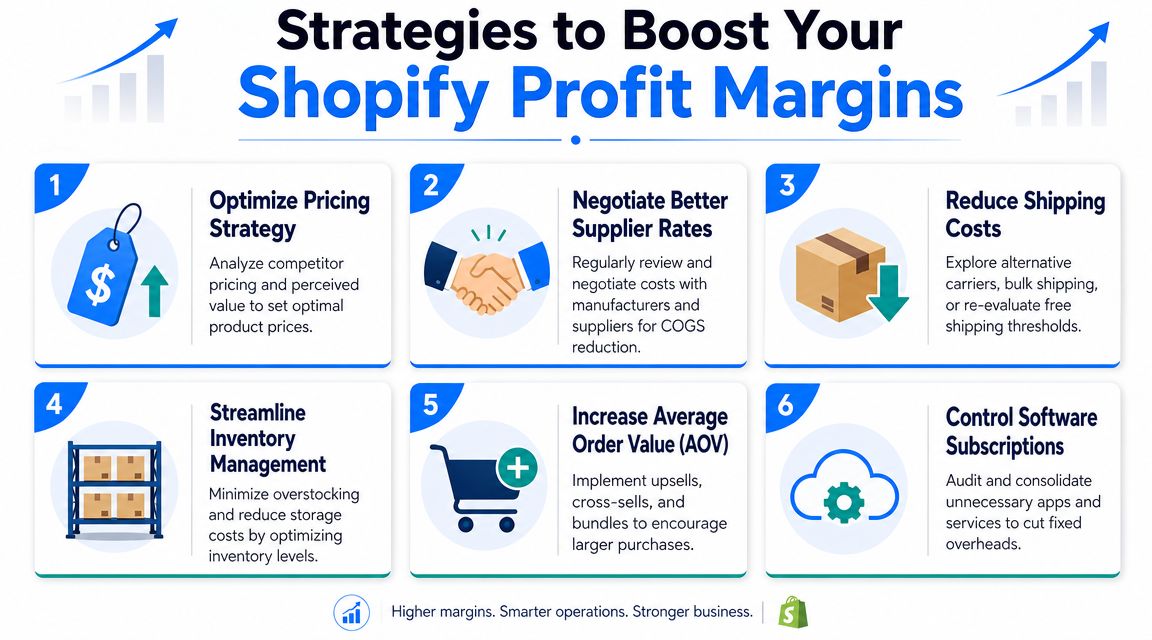
Improving margin usually doesn't come from one dramatic fix. It comes from tightening the model from three directions: better revenue per order, lower variable cost per order, and smarter acquisition.
Raise profit from the top line
Start with the order itself. A higher-value order can absorb more fulfillment and acquisition cost than a low-value one.
- Improve offer structure. Bundles, add-ons, and threshold offers often preserve margin better than blanket discounts.
- Tighten pricing. If buyers respond to positioning, merchandising, and product trust signals, a price increase may do less damage than expected.
- Use post-purchase and cart-stage upsells carefully. The goal isn't just to sell more items. It's to improve contribution margin per order.
Protect margin on the cost side
Some margin problems are operational, not marketing.
- Audit your app stack. Too many stores carry dead subscriptions for tools nobody uses.
- Review shipping policy. Free shipping can work, but only if your pricing and threshold strategy support it.
- Negotiate suppliers and packaging. Small savings at the unit level matter across every sale.
- Watch return drivers. Weak product pages, unclear sizing, and misleading photos often create expensive downstream costs.
For a broader operational perspective, these strategies to boost profitability are a good read because they connect finance decisions with day-to-day store operations.
Use marketing that improves economics, not just conversions
Many stores struggle with this aspect, treating every discount as margin loss. That's too simplistic.
A coupon can hurt profit if it only discounts people who were already going to buy. But an offer can help profit if it captures an email subscriber, lowers blended acquisition cost over time, and moves future sales into owned channels like email and SMS instead of paid media.
That distinction matters a lot with pop-ups and on-site conversion tactics. A basic discount pop-up may train visitors to wait for a code. A more strategic offer can collect more qualified leads, segment them properly, and reduce dependence on paid acquisition over time. Mobile execution matters here too, because weak mobile experiences depress conversion before margin math even starts, which is why this guide on mobile conversion optimization is worth reviewing if most of your traffic is mobile.
Marketing should be judged by its effect on blended profitability, not by conversion rate alone.
The best operators ask harder questions:
- Did this campaign lower paid dependency?
- Did it capture owned audience we can monetize later?
- Did the discount create incremental demand or just give away margin?
- Did the customers acquired through this path come back?
Those questions lead to better decisions than "the popup converted" or "the ad got sales." Profit margin improves when your store gets more intentional about who it acquires, what it offers, and how often it relies on rented traffic.
If you want to grow your email list without relying on the same static popup every other Shopify store uses, SmashPops gives you a more engaging option. It turns list-building into an interactive experience with gamified pop-ups, one-time coupon rewards, flexible targeting, and integrations with tools like Klaviyo and Mailchimp, so you can build owned audience faster and put more of your revenue on channels you control.
